







Hit the orange Focus button on the NFL, NHL or NBA Bet Lab to work one market at a time. Every prop gets a report card: Defense, Position, Team, Game, Form and Role, each graded A to F, blended into one Overall letter you can sort and filter on.
The table swaps in the columns that matter for that bet, like his last ten games, his usage and the opponent's key number. Exit Focus and your own filters come right back.
The Player and Team Matrix are rebuilt for phones. Swipe through the presets, open every filter from one Filters button, and swipe the stats sideways while the player's name stays pinned on the left. Tap a column to sort and tap a player to see his games.
Every game on the Goalies page has a Share button. Post a matchup face to face, one goalie at a time, or a table of every starter tonight coloured good to poor. Portrait or landscape, ready to copy, share or download.
Opens on the answers: who scores a touchdown, most passing, rushing and receiving yards, most catches. Every stat has its own ranked board with the line, the model's lean and the value, and you can look up any player for his whole week. It loads in a blink now, and boards, props and players all share as an image.
The tip card now uses whoever actually jumped, with a head to head record when the two jumpers have met. Player tables count every shot taken before the first basket: shots a start, shot share and Hit %, which also sharpen xFB.
New: a Race log of each team's last 10 first baskets (or every meeting between the two), opening into the play by play from the tip; a shot chart of where each team shoots before its first basket, and where opponents shoot against it; How and Where views on the attack vs defense cards; opening trip rows in Who scores first; and click any player for his shots, on a court and shot by shot.
Starters now follow the books: a starter they leave unpriced drops out and the priced teammate takes his spot, with a note saying why. Injury tags refresh every 30 minutes, show in Change jumper, and your season or L20 pick stays put between games.
The share picture now keeps the table's order, so sort by points per game and that is what you share. Pick up to three hit rates (like 20+, 25+, 30+ points) to show in the picture.
Under Research. How often each defense lets the QB, RB1, WR1, WR2, TE1 and more reach a line, like 50+ receiving yards in 12 of the last 15, ranked against the league with who they face this week. Burned or Held, L5 to L20 and streaks, a Book tab with every team's numbers for one prop market, a By team tab, and every card saves as an image.
The Share button beside the calendar makes a leaderboard picture of any tab, with tabs in the window to swap market. Markets sort by how often each player went over tonight's line. Share in a player's game log makes his own card: averages, every line tonight with his over rate and best price, and his recent games against the opponent.
Under Research in the NHL sidebar. Pick a team and up to three players, set each to Out or Plays, and see how the team and every teammate did with and without them: ice time, power play time, goals, assists, points, shots and hits. It opens on tonight's injury report, and Share image makes a picture of it.
The Share button beside the calendar turns the tab you are on into a leaderboard picture, with your filters and sort, hit rates and best prices. Share in a player's game log makes his own card: totals, hit rates with tonight's price, and his recent games against the opponent. Story for phones, Portrait for feeds.
Pick a team and a player, then tap Share image: who it helps and hurts, the team with and without him, and the receiving and rushing tables in one picture. Story for phones, Portrait for feeds.
Tap Share on First Basket: the opening tip, who scores first, the position splits and all ten starters with their best price, for the matchup you are on. Wide and Square lay it out side by side.
Pick a team and a player, then tap Share image: who it helps and hurts, the team with and without him, and the teammate tables in one picture. Story for phones, Portrait for feeds.
Tap Share on a game page. Simple is one picture with the score, the win probability swing and team stats. Detailed adds the shot chart, betting result, swings and both box scores. Portrait for feeds, landscape for X and Discord.
Overview tiles are simpler, with the softest spots in red, and tapping one opens that player's Bet Lab dashboard on the stat. Share Images now makes one tall picture per game, up to 10 soft spots a team, sized for Stories and phone feeds.
Every NBA game with a live score that updates about every 30 seconds. Open a game for the win probability swing, a shot chart, team leaders, full box scores and every play.
Every market now has its own Lab, built on the new tracking data: rebound chances, passes, contested shots, deflections and more, with simple bars comparing tonight's window to his last 50 games. The opponent table at the bottom shows the stats that matter for the prop you have open.
Every share card now has a shape picker: Original, Square, Portrait for the Instagram feed, Story for Instagram and TikTok, and Wide for X. Your card sits on a KrashBoard backdrop cut to that shape, so nothing gets cropped, and the site remembers the shape you last used.
Tap the share icon at the top of the betslip to turn any slip, up to 20 legs, into a branded ticket with every leg, the parlay price, your payout and what every book pays. Switch the wager, the edge and the book grid on or off, then copy the image, save it, or copy it as text.
The Overview opens on Key edges, then every main market as a tile with the best price, the model's chance and the edge. A goals chart prices any total or team total number, form and head to head show each game against its closing line, and By period and Game script panels show how each team's games unfold.
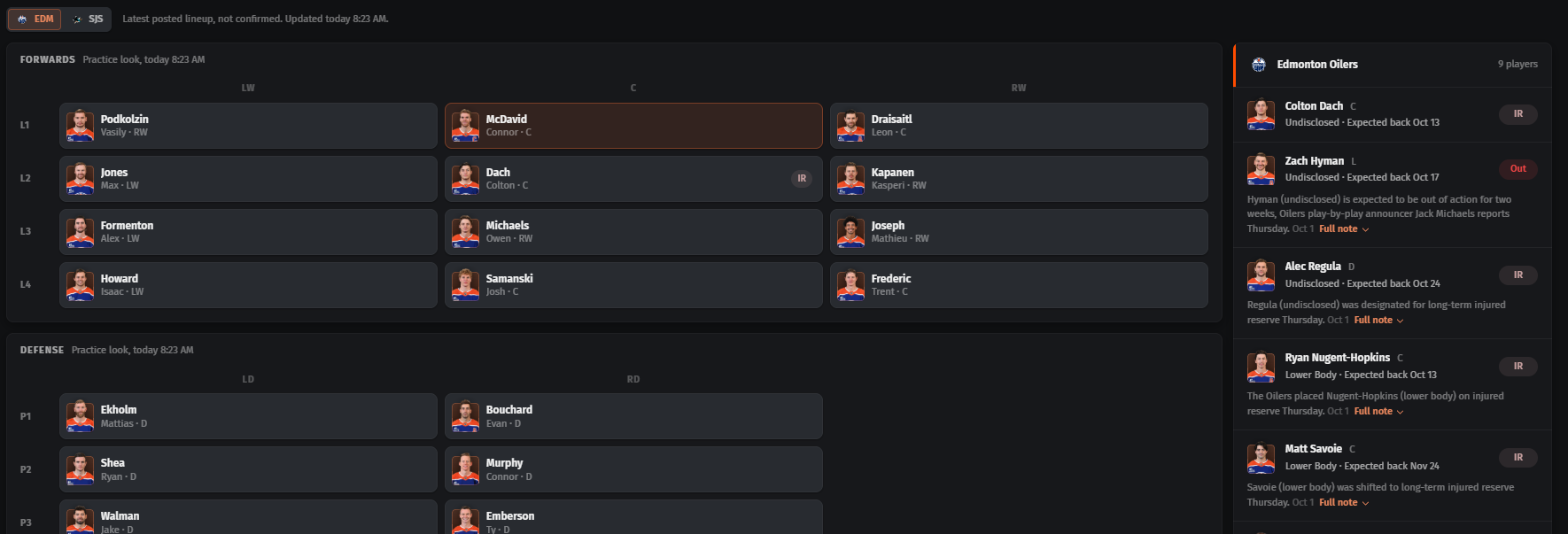
New Lines tab: both teams' posted lines and power play units with each skater's recent points and ice time, the injury report with return dates, and stacks, the linemates who record a point in the same game. New Goalies tab: the Goalies page card for this game and a full profile for every goalie on either team.
New Roster tab runs the Stat Matrix on one team. New Logs tab lists every game with NHL.com style reports: summary, days between games, goals by period and strength, leading and trailing, shot attempts, special teams, faceoffs and more.
A shot map shows where each defense gives up shots, zone by zone with league ranks, next to defense vs position tiles for centers, wingers and defensemen.
Click any past game for its box score.
The Full Table opens on ranks, with columns in line order (LW, C, RW, D). Click any player on the right to open his Bet Lab dashboard for that prop without leaving the page.
The Injuries page now opens on one list of every injury, newest news first, with each team's card below. Tap a row for the full note.
The NFL Bet Lab opens in a few seconds and fills in the rest as you browse. Player names stay put when you scroll sideways, and the player window now prices off the books you picked. On NHL, filters live in the link so you can share a view, and the board refreshes itself for goalie and lineup news.
Both goalies side by side over the last 5, 10 or 20 games or a full season, the model's saves range for tonight, and a click on either goalie opens his saves dashboard. The first game each day is free.
A darker, cleaner theme on every NFL and NHL page, one green to red colour scale for ratings and ranks, and pages and windows that load and open smoothly.
Shots, Goals, Assists and Points each open with the team's projection for tonight, how we got there, and matchup grades for both sides.
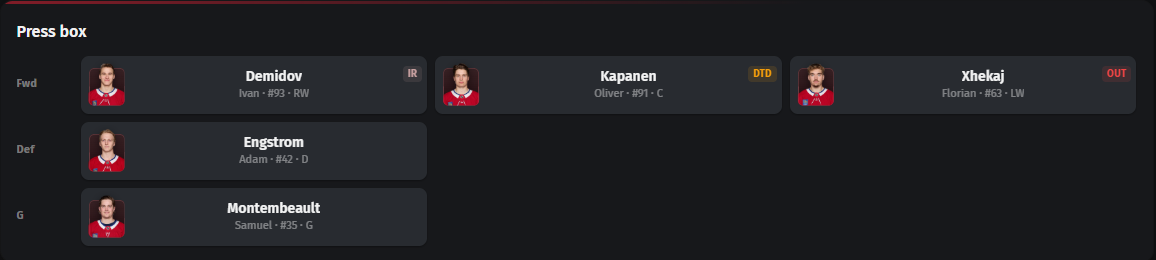
Anyone on the injury report now carries a badge on the Lineups page: day to day, out, injured reserve or suspended. Hover for the details.
The player dashboard's Lines tab is now Team: the full posted lineup, both goalies and both power play units, with the team's injury report beside it.
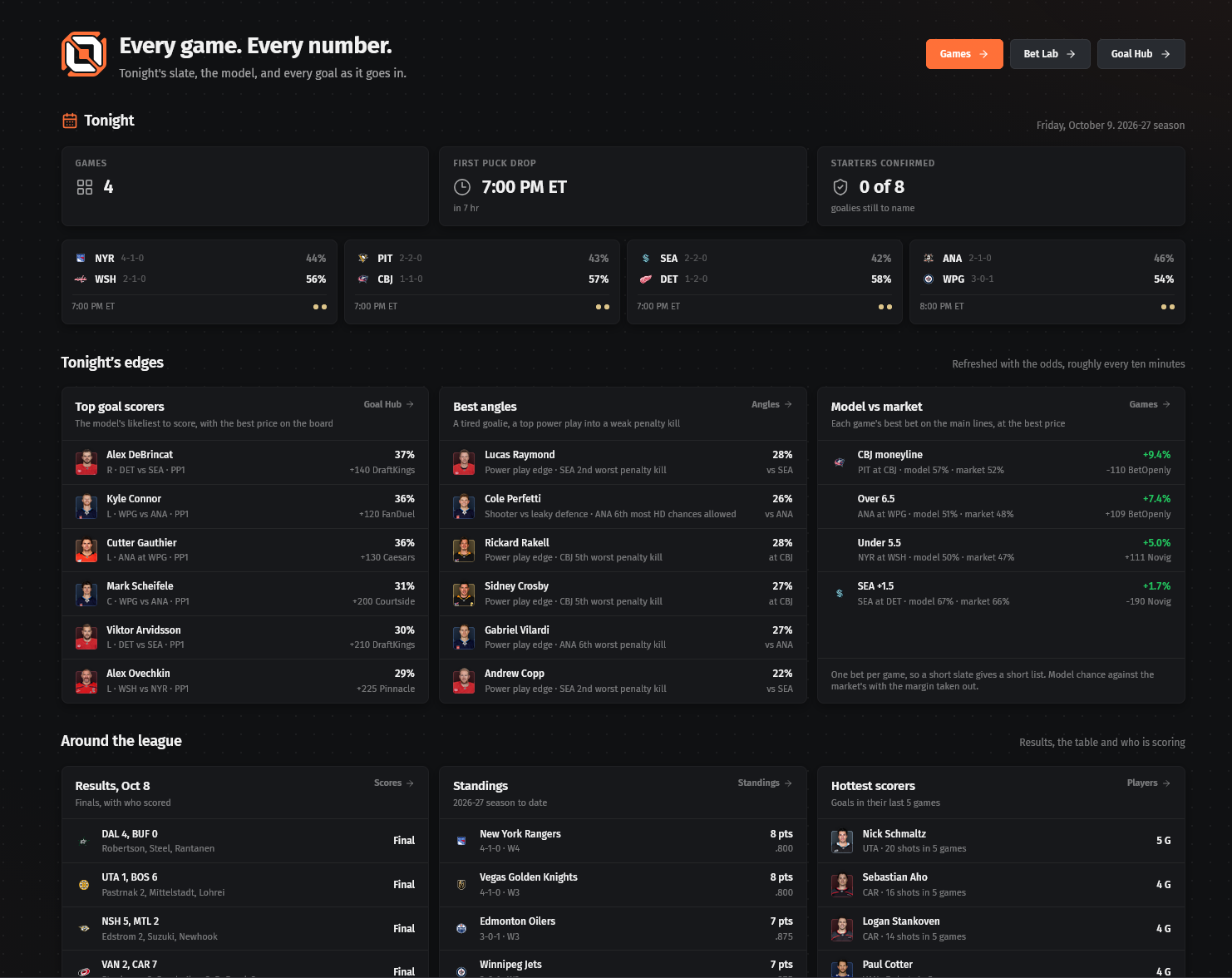
No account needed for the NHL home page, the Goal Hub, the Bet Lab on goals, Scores, Lamp Lighters, Standings, Teams, Players, Goalies and Lineups.
Tonight's top goal scorers, the best angles and model edges up top, every goal live once the puck drops, then straight on to tomorrow's slate.
Sportsbooks, Betting Setup and Display are now one Preferences tab that saves as you go. Every book we carry odds for is in the list.
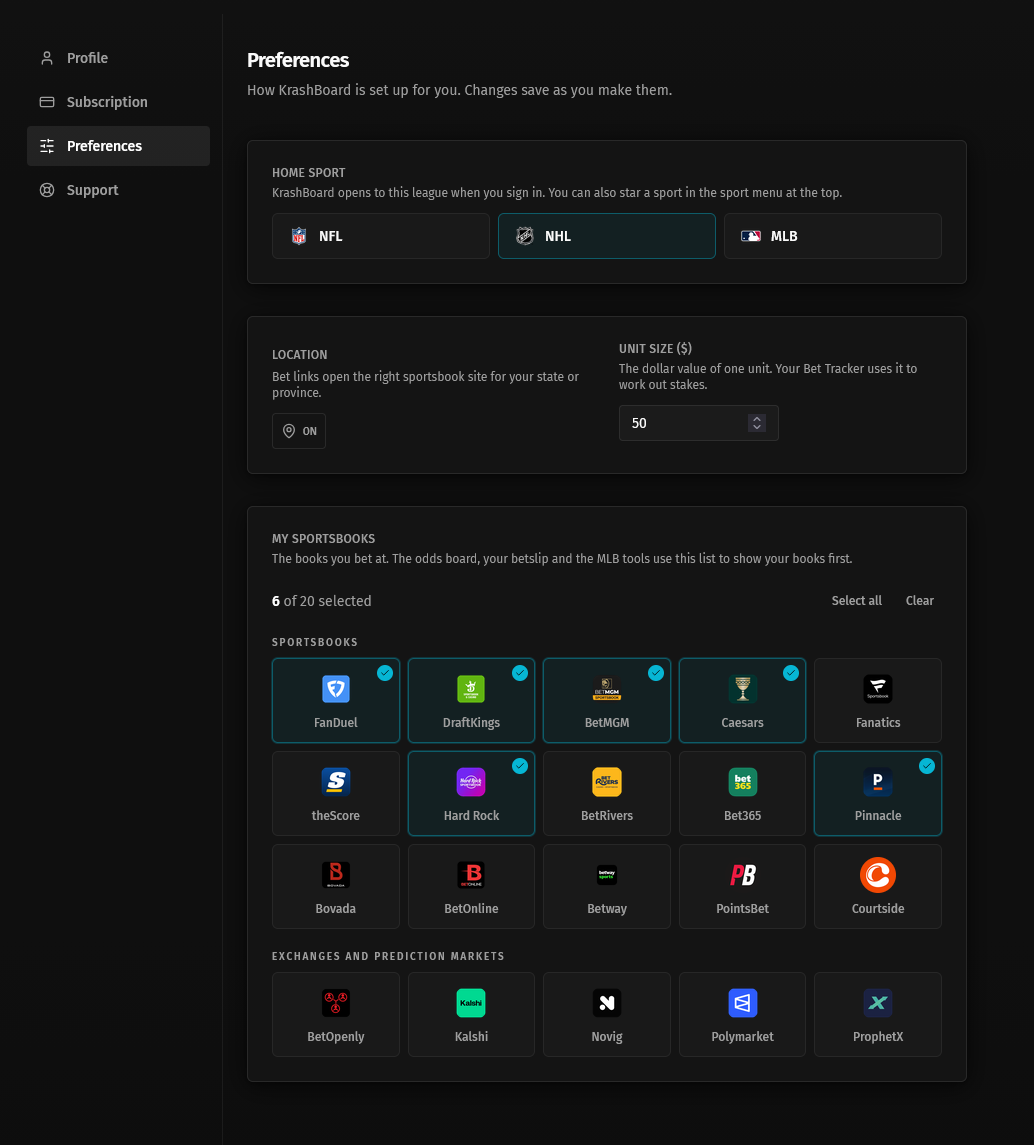
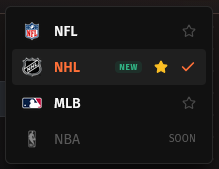
Star a sport in the sport menu and KrashBoard opens there, on every device.
The bottom of the Breakdown tab is now one section, Matchup by market. Pick a team and a prop market at the top, and both the team charts and the player table follow.
The charts change with the market. Goals, Assists, Points and PP points show goals, 5v5 goals, power play goals and high danger chances. Shots shows shots on goal, 5v5 shots, power play shots and shot attempts. Hits and blocks shows hits and blocked shots. The attacking team sits on top, with what the other team allows underneath.
Power play goals now show the power play chances behind them as a grey dotted block on each bar, and shots on goal do the same with total shot attempts, so you can see how many came from how many tries.
The player table now lists the team you picked, the same team attacking in the charts above.
The Breakdown tab now has its own phone layout. A row of chips stays pinned to the top as you scroll: Model, Odds, Goalies, Teams, Form, Charts and Players. Tap one to jump straight there, and the chip for the section you are reading lights up.
Every section was redone to fit a phone. The header shows both teams, their records, rest and goalies without anything overlapping. Odds and head to head list in full, with no boxes scrolling inside the page. The team and goalie comparisons get longer bars, and each team's last 10 games sit in one full-width strip.
Offense vs defense now shows one stat at a time. Pick Goals, 5v5 goals, PP chances, PP goals or Shots and see the attacking team's numbers above what the other team allows.
Players is now a list of cards instead of a wide table. Each card shows the best price, line, model chance and EV, then his hit rate and a stat you choose over his last 40, 15 and 5 games. Sort by hit rate, EV or model, and tap the team, position and lineup tokens to filter. Tap any player for his Bet Lab dashboard.
NHL Games now has two tabs. Games is the slate you know. Breakdown takes one matchup and lays out everything you need to handicap it on one screen, like a terminal. The next 30 games sit in a row of tiles across the top, with the date between days. Click one to load its breakdown.
Up top: the model's win chances, expected goals and its best side in each market against the price, the goalie duel over his last 5, 10 or 30 games or a whole season (with a Change button if the wrong goalie is listed), and each team's form and overtime record. The team matchup compares who controls play at five on five, goals for and against, shooting and save percentage, and special teams, with what each power play should do tonight. Its windows (last 5, 10 and 30 games) now reach back into last season, so early-season numbers are not a two-game sample.
The Odds card lists the best price across every book with the no-vig chance, and All books opens every price. Head to head, lineups and the model's full charts are one click away.
Offense vs defense puts one team's goals, five on five goals, power play chances, power play goals and shots game by game above the other team's matching numbers allowed. Swap which team attacks with one button.
The player table has a tab per prop: Goals, Assists, Points, PP points, Shots, and Hits and blocks. Each shows the line, best over, model and EV, then the hit rate and the key stats for that prop over his last 40, 15 and 5 games, green when he is running hot and red when he is cold. Click any player to open his Bet Lab dashboard.
The NFL and MLB odds boards are now one page, and NHL is on it too. Every upcoming game sits on one slate as a card with the best spread, moneyline and total across every book, and the logo of the book offering it. Filter by sport and day, or search a team or a player.
Click a game, or any price on its card, to open every market for that game: moneyline, spread, total, team totals, periods and every player prop. Each row shows every book's price side by side with the best one outlined in green, plus a Fair column with the no-vig price, the same fair Positive EV uses. Exchange prices show how much they will take. Alternate lines are one tap away, and clicking a price opens the bet at that book when the book gives us a link.
On a phone each bet becomes a card listing every book's price, best first. Your old NFL and MLB odds board links still work and land on the new page.
My Picks is now My Goal Tracker. On game nights, Live tonight shows a card for every pick with the score, the clock and his shots so far. When he scores the card turns into a green GOAL with the period, time, shot type and the goalie he beat, plus buttons for the clip and the tracking replay.
Below that: your record, units, ROI and how often your picks score next to what the model and the books expected. A running units chart, a strip of every night, breakdowns by price, Model %, angle, position and book, your most-picked players, and a full pick log you can filter. Picks saved after puck drop still count and carry a Late tag, and a pick can't be removed once his game starts.
Research is now Angles: tonight's best goal spots, each led by the reason it stands out, like Tired goalie or Shooter vs leaky defence, with the model's chance as the big number and filter chips by angle. Under it, one slim row per game shows the goalies, each side's weak spots and its top scorers. Any name opens his Bet Lab dashboard.
On the Leaderboard, a new 1+ column shows how often he scores in the games you picked. The Books and Vs Pack columns are gone, the save button is now the siren, and every button and filter matches the Bet Lab.
A new Strength switch sits above every Stat Matrix table. Skaters: All, Even, Power play and Shorthanded. Goalies: All, Even, his team on the power play and his team shorthanded. Teams add 5 on 5 and Close. Flip it and every column turns into its version at that strength, so Overview on Power play shows power play goals, assists, points, shots and ice time.
Find a stat, next to the presets, searches every stat and drops it straight into your table. Per 60 joins Totals and Per game, using ice time at the strength you picked.
Fewer, clearer presets: Power play, Situational and Per 60 are now the switch and the display options. The old Situation menu is renamed Game filters.
Every rink is now white ice, with the NHL shield at centre ice on the big one. The night in numbers shows each count with its per game rate underneath.
Pick a leaderboard from the row of buttons: Multi goals, Points, PP goals, Longest goals, Biggest goals, GWG, First goals and Last goals. Tap a player to jump to his goal.
Every goal card now shows the best anytime goal price he had before puck drop. Watch links that were missing late at night now fill in the next morning, and tracking replays are added for every goal automatically.
In the game window, Overview now draws goalies, five on five and special teams as bars from the middle, green for the league's best and red for the worst. Schedule and news is two compact team cards, and matchup angles are short headlines with the key number highlighted.
The Model tab opens on a scoreboard: each team's projected goals, win chance and goalie under its own name, with the biggest edge moved down beside the market prices. On Matchup, rank badges line up in one column and tonight's numbers stand out.
The rest line on each game card says each fact once. In the Bet Lab, Vs Opp now counts every game against tonight's opponent on file, the same as the player dashboard, and the Score ring runs green to yellow to red.
NHL Defense vs Position now opens on the same Soft Spots report as the NFL: every game on the night on one card, showing where each team gives up the most to centers, left wings, right wings and defensemen, ranked out of 32 (32nd gives up the most), with a player for every one.
Each line names the player who does the most of that stat on his team over his last 10 games, with the best price for his prop. Shot attempts and high-danger chances have no betting market, so those show the player and his usual line.
Up top, three tiles sum up the night: the team with the most soft spots, the biggest single gap, and the softest team against each position. Switch the ranks between last season, each team's last 10 games and this season, step to another game day with the arrows, filter by puck drop or position, search a team or player, or sort softest first.
Share images turns every game into a picture ready for social. Copy one straight into a post, share it, or share all of them at once. The full table is one tab over, under Full Table, and now splits wingers into left and right wings too.
The siren next to the betslip in the top bar opens your NHL goal picks on any NHL page. Every player you starred is there with tonight's best anytime goal price, the price you saved him at when it has moved, the model's chance, the edge and his Goal Score. Sort by Score, Model %, Edge, Price or Puck drop, and filter by game or position.
Heart a pick to put it on your betslip, which sits on the right with what the parlay pays next to the book's chance and the model's. The arrow on each row shows every book's price.
Share turns your picks into one picture, grouped by game with headshots, model chance and price, ready to copy into a post or save to your phone. Finished games drop off and stay graded on My Picks. On a phone, open it from My goal picks in the menu.
The Goal Hub opens on a Leaderboard built like the NFL Endzone's: every skater on the night in one table, sorted by the NHL model's chance he scores. Next to it sit the best anytime goal price, how many books post him, the implied chance, how the best price compares with the other books, expected goals, EV and his Goal Score.
His own numbers fill the rest of the row: goals, power play goals, goals a game, expected goals from his shot mix, shooting %, first goals, shots, attempts, high-danger chances, ice time and power play time, and how often he has scored over his last 5, 10 and 20. Switch the window between All, L5, L10 and L20, pick a season, or open Filters to cut his games by home or road, wins, back-to-backs, opponent, ice time and power play time.
Pick one game from the slate on the left to see only that matchup, with each team's expected goals and tonight's goalies. Click a price to see every book's number, or click a name to open his Bet Lab dashboard on anytime goals. The star saves him to My Picks and the heart adds the bet to your betslip.
Defense vs Position now opens on an Overview tab: every game this week on one card, showing where each defense gives up the most over its last 10 games, ranked out of 32 (32nd gives up the most), with a player prop for every one. Each line tells you the yards or catches allowed a game and how far above the league average that is.
Up top, three tiles sum up the week: the defense with the most soft spots, the biggest single gap, and the softest defense against each position. Switch the ranks between each team's last 10 games and the 2026 season, filter by kickoff or position, search a team or player, or sort softest first.
Way more to rank: ADOT, deep targets and deep yards, yards after catch, red zone looks, catch rate, 10+ and 20+ yard runs, longest run and catch, yards per carry, stuff rate, and for quarterbacks passing yards, TD passes, completions, sack rate and pressure rate. Each one points to the bet it fits (longest reception, longest rush, pass yards and more) and to the player who owns that stat on his team over his last 10 games. The Full Table gets every new stat too, grouped into Scoring, Receiving, Rushing, Big plays and Quarterback.
Share images opens every game as a picture ready for social. Step through them with the arrows, then copy one straight into a post, share it, or share all of them at once. The full table you know is one tab over, under Full Table.
The context tiles from Shots on goal now sit under the charts on every NHL prop: Goals, Points, Assists, Hits, Blocked shots and Power play points. Each tile sets his number next to the average forward or defenceman and his own last 50 games, so you can tell at a glance whether 12% shooting or 2 hits a game is good.
Goalies get the same treatment against the average NHL starter: shots and saves a start, save %, goals against next to expected goals, and save % at even strength and on the penalty kill. Every chart takes the new orange look, and Ice time shows his last 5 game average.
Every chart under the Shots on goal hit rate now carries a row of tiles that tells you whether a number is good: his number in the games you picked, next to the average forward or defenceman and his own last 50 games. Green is better for a shooter, red is worse.
New Shot danger chart shows his high, medium and low danger attempts each game. Goals now stack assists on top, Ice time draws his last 5 game average as the line, and the charts take on KrashBoard orange. The main hit rate chart shows the opponent's logo under each game.
The Opponent section has a new Players vs table: every skater's game against tonight's opponent over its last 10 or 20, with position chips, a 10 minute floor and a Similar TOI filter that keeps only players who got about the same ice time as yours.
On a phone, the opposing goalies are now tiles instead of a sideways table, and the Shot quality filters are a row of dropdown buttons.
Open any player in the NHL Bet Lab and the Lab and Logs tabs now have the same filter row as the NFL: When, Where, Rest, Matchup and Result, plus a stat filter.
Cut his games by back-to-backs, days of rest, road trip game, long travel, time zones crossed, the opponent's rest, division games, the goalie he shot at, wins and losses, overtime, one-goal games and more. The hit rates and every chart follow. Tonight's game is marked in each menu so you can match the spot he is in.
Hockey is here. Pick NHL from the sport menu at the top of the page to open the new NHL section, included with your membership.
It starts with the Bet Lab and Games, then League pages (Scores, Lamp Lighters, Standings, Teams, Players) and Research tools (Goalies, Lineups, Stat Matrix, Defense vs Position, Player vs Opp). Positive EV now covers NHL props and game lines too.
Run a betting account, Discord or newsletter? Our partner program pays you 50% of every payment from everyone you refer, for as long as they stay a member. Paid out on the 1st of every month.
It is invite only. Open Partner program in the sidebar to see how it works and apply.
Click any player in the Rushing or Receiving table on Lineup Impact and his game log opens: every game he played for the team, with snaps, carries, targets, catches, yards and touchdowns. Quarterbacks get their passing line too.
A toggle switches between games without the player you picked, games with him, or all of them. In All, each game is tagged With or Without. The per-game averages at the bottom match the table, so you can see exactly which games a number stands on.
Five new pages under Research in the NFL sidebar. Player Roles shows every skill player's snaps, targets and carries, and who is gaining or losing work. Lineup Impact picks a player and shows what happens to his team and every teammate when he is out, or when he plays. The top of the page lists this week's key injuries and quarterback changes, and you can mark each one read or pin it.
First TD puts every game's first touchdown chances side by side with each book's price, backed by how teams open games. Kickers projects field goal volume for every kicker from team scoring and how often the opponent holds in the red zone. Game Script sorts the slate into Shootout, Blowout, Comeback chase, Grind and Coin flip, and sends any script straight to the Parlay Generator.
The Endzone has a new Heat Check tab, free for everyone: who is on a heater, who has gone cold, who is due based on their red zone work, and who is scoring more than that work supports.
The Bet Lab has a Share button. Pick a market and it builds a ranked cheat sheet picture from the board, ready to post.
Positive EV's filters got an upgrade. Long lists like Markets have a search box, and Markets and Books both have Select all and Clear all, so picking two markets out of forty is two clicks. The Markets list now only shows the sports you have picked.
Min EV and Min liquidity keep their quick buttons and add a box for your own number, say 1.5% or $75. Starts has a calendar: pick a first and last day to see only games in that window. Days with games carry a dot.
The share card now shows how much money is available at each exchange price, next to the book's tag.
Every line movement chart on the site, in the Bet Lab, Endzone and Positive EV, now works like a map. Once zoomed in, click and drag to move around. A strip under the chart shows the whole week with a box round what you are looking at: drag it, stretch it, or click anywhere on it to jump there. 1H, 6H, 24H and All buttons jump straight to the latest stretch.
Point at a line and that book lights up, the others fade, and the tooltip shows just that book's price. The price tags on the right are easier to read. On a phone, drag with one finger once zoomed, pinch to zoom, and tap a line to pick it out. The book list sits above the chart as a row you can swipe.
Part of the NFL section is now open to everyone. The NFL home page, House Call, Endzone, Weather Report, Teams, Standings and the calculators work without signing in, and the landing page walks straight into them. Send anyone a link.
Visitors can open the touchdown dashboard from the Endzone Leaderboard, on the anytime touchdown market only. Every other market on a player, the Bet Lab, Player Projections, Positive EV, the Parlay Generator, Games and everything MLB are for members, and the sidebar says so with a lock beside each one. Clicking a locked page shows the plans.
The Endzone list still works signed out, as a scratchpad in your browser: it clears every Tuesday at midnight Eastern and nothing grades it. Members keep their list on their account and get every pick graded on My Picks, as before.
For members nothing changes, apart from one thing you will notice: the touchdown dashboard on the Leaderboard opens faster, because it now loads just the touchdown market first and fills in the rest of the player's props behind it.
The landing page has been rebuilt around NFL, with the free pages up front and the member tools below. The sport menu now lists NHL and NBA as coming soon: both arrive in October.
A Share button now sits at the top of your Endzone list. It turns the whole list into one branded picture, a panel per game with each player, their headshot, the model's chance to score and the price. Copy image puts it straight on your clipboard to paste into a post; browsers that cannot copy images download it instead.
The Overview tab in the Endzone matchup window has a Time frame picker: this season, the last 5 games, the last 10, or last season. Last 5 and Last 10 reach back into last season when this one is still short, so early weeks are not judged on one or two games. The whole tab re-ranks when you switch, and it remembers your choice.
Prices from Courtside, Betway and PointsBet Canada now come in with every other book on the NFL and MLB odds, so they show up in line shopping, best prices and Positive EV.
The NFL and MLB EV Markets have been replaced by one page, Positive EV, in the menu for every league. Each row is one bet with its edge, the best price among your books, the fair price and a Kelly stake. Click a row and every book's price on both sides opens underneath, with the books that set the fair price tagged REF and exchange quotes showing how much you can actually bet. A line under the prices says in plain words why the bet is +EV, and warns you when a price looks stale or broken. Each league has its own colour, so a mixed board reads at a glance.
Comparing picks who sets the fair price: our sharp blend, Pinnacle alone, the whole market, or your own formula. The formula lets you give any sportsbook a weight from 1 to 10 and lock the books a bet must include. Settings choose the devig methods and whether the edge shown is the worst or best of them, plus your bankroll and Kelly fraction.
Save any setup as a preset, filters and formula together, and switch between them in one click. Star one to open the page on it. The plus on every row adds the bet to your betslip, and the bet button opens it at the book, on your state's FanDuel site when your location is set in Betting Setup.
Every row also has a share button that turns the bet into a branded card you can copy as an image or as text, and on NFL bets a line movement chart showing how each book's price has moved. Exchanges and prediction markets (Kalshi, Novig, Polymarket, ProphetX) can now help set the fair price if you give them a weight in the formula; each one is checked against the sportsbooks first, and a price far from where the books sit is left out.
Out of the box the board is conservative: a 1% minimum edge, prices from -250 to +1000, at least $25 available on an exchange, and bets with only one side posted anywhere hidden until you ask for them. NHL and NBA join the board when their seasons start.
Defense vs Position is the first of our NFL cheat sheets, under Research in the menu. Pick a stat (touchdowns, receiving yards, receptions, targets, rushing yards, carries and more) and every game of the week is laid out as a pair: what each team's QBs, RBs, WRs and TEs produce, beside what the other team's defense gives up to them. Green is good for that team, red is bad, so a red Allowed tile is a soft matchup.
Look at the last 5, 10 or 20 games, or a whole season, as per game averages or totals. Each tile can show the number itself, the team's league rank from 1 to 32, or how it compares to the league average, where 100% is average. Passing touchdowns and interceptions are split by who the ball was thrown to, so the WR column says how many passing scores a defense gave up to wide receivers.
Click a game and the panel on the right ranks every position matchup in it for the stat you picked, from the best spot for the offense to the worst, with a card for each player who stands to benefit: the prop, the best price among your books, how often they have cleared the line in their last 10 games and the model's chance. Prices only come from the sportsbooks chosen in your profile settings.
On a phone the filters live in a slide-up drawer, the table fits the screen, and tapping a game opens its players in a drawer of their own.
Every chart on the player prop dashboards has been reworked in one pass. Games that lost against the line are red, not grey. The supporting charts (snap share, targets, air yards and the rest) are a muted blue instead of grey, and every stack and trend line draws from the same three-step blue family, so a panel never has to be relearned from the one next to it. Bars fill their slot with a 2px gap instead of leaving a fifth of it as air, and the betting line on the hit rate chart is now drawn in yellow over the bars rather than grey behind them.
The x-axis follows one rule everywhere: every game is labelled when the labels fit, otherwise a fixed stride that restarts at each season, with the first game of every season always labelled. A season divider now actually draws between seasons (it never had), with the year written against it, so a three-season window can thin its week labels hard without you losing your place. Every bar carries its number when there is room for it: above a single bar, inside a stack's band when the band is tall enough to hold it, and above or below the zero line on the gap charts.
On Receiving Yards, four charts changed shape. Target share is now the per-game share as bars with the last-3 average riding over them, in place of four rolling lines. YAC against expected and Receptions against expected draw the gap, green above zero when he beat the model and red below when he fell short, instead of asking you to compare a bar to a dot forty times. First read and Uncontested are share lines over the last five games with the window's split bar under them, since the read is how often, not how many. The EPA chart leads with the L3 line against the L10 baseline, with L5 drawn faint.
The Endzone list window is now half as tall again and half as wide again, with rows tightened so fifteen picks sit on one screen instead of ten. Each row reads left to right: the heart that saves it to your betslip, the player and matchup, the Bet Lab's Score ring, the model's chance of a touchdown with its bar, expected touchdowns, the edge between the model and the best price, the price with its book, the orange button that opens every book, and the bin.
The Score is the same 0 to 100 prop rating the Bet Lab shows, on the anytime touchdown, so the two pages agree about the same bet. Edge is the model's chance against the best price, green when the book is paying more than the model thinks the touchdown is worth.
A bar under the header sorts the list by Score, 1+TD, Edge, Price or Kickoff, and remembers your choice. Beside it, one chip per kickoff window (Sun 1:00, Sun 4:25 and so on) and one per position cut the list down; untick them all to see everything.
On the right, your betslip's active slip sits beside the list: every leg on it, the best price the parlay pays and which book carries all of it, the chance that price implies, and the model's chance of the whole thing landing, with a note when two legs share a game. Hearting a pick on the left puts it on the slip at once; the x beside a leg takes it off. Open betslip goes straight to the slip. On a phone the slip is a bar under the list.
The Projections tab now draws every player as the same row, leader included, with a rank down the left, the Bet Lab's team-tinted headshot tiles, and the model's chance to score coloured on the Leaderboard's green-to-red scale. The best price and its edge sit in one column and the percentage in the next, so the two ladders read straight down. Fair price, book count and per-game rates are one click away: the row opens every book's price, the dots' hover carries the rates, and a three-dots menu holds line movement, the betslip and your Endzone list.
The Opportunity tab's filters have been rebuilt. Six menus instead of seven, no borders, a colour per menu. Situation has one field position row (Inside the 5 through Backed up), the downs with Goal to go on the end, and the quarters with Two minute drill. Play result is one grid of single chips: Touchdown, First down, Explosive, Turnover and the rest, where unticked means no filter. The Personnel menu is gone, Opponent lives under Game, Home and Away and Favourite and Underdog say just that, and every min and max box now lives behind the one Stat filter button. Both this season and last load by default, and the When menu carries Last 5, 10 and 17 games as one-click chips.
Above the table, three new presets: Inside 5, Inside 10 and 10 to 20. In the table, a bookmark on every row saves to your Endzone list without opening the menu, the Snap% column and the model's two columns have come off, the rows are no longer striped, and the Games column now counts the games a player actually played in the seasons and weeks chosen rather than the games he happened to get a matching touch in, so per-game figures divide by the right number. A new GW column beside it keeps the old count, games with a touch in the cut.
Every NFL page now renders in Fira Sans, the same face as the shell around it. A handful of pages had been falling back to the system font.
A Score ring now leads every row of the Bet Lab table: a 0 to 100 rating of the prop itself, built from how often the player clears the line, the volume behind it, the matchup and recent form. It is a quick read on the bet, not the model, and it ignores the price on purpose: a 95 at -400 is a strong prop and a poor bet, and the EV column is where that shows. Hover a score for its band, from Elite down to Low.
Sort by it to bring the week's strongest props to the top. Every player prop and every alternate line is scored; game lines and team totals show a dash.
On the phone the card's tile strip now opens with Score and Model, then 2026, L17, L10 and L5. The 2025 and Streak tiles have come off to make room; both are still on the desktop table.
The Matchup column is gone. The matchup now sits beside the player's position on the Bet line, with the player's own team picked out, and the kickoff time and week are off the row. Alt lines has moved along the filter row to sit after Odds, the filter buttons sit on a shadow instead of a border, and every colour on the page, the score, the EV chip, the hit rates, now reads on the Endzone Leaderboard's scale: Elite green down to Shutdown red, with the same greys in between. Implied % lives under the price rather than in its own column.
On a phone the NFL home page now opens straight on the week. The hero, the three shortcut buttons and the four count tiles are gone from the small screen, the game cards run as one strip you swipe sideways, and where the insight panels were there is a Top touchdown scorers list: the five highest model chances of the week, drawn with the Endzone Leaderboard's own cards. Tap a name for the scorecard, tap the price for every book, and the bookmark and heart save to your Endzone list and betslip, exactly as they do on the Leaderboard. A button underneath goes to the full board.
Every card on the home page, on desktop as well, sits on a drop shadow instead of a border. The projected scores on the game cards are coloured on the Leaderboard's scale, green for the week's highest projected totals down to red for the lowest, so a card says at a glance where the model thinks the points are. Section headings carry an icon.
The phone header carries the KrashBoard mark on the left and the sport selector and ToolKit buttons on the right, on every page. Both have come out of the slide-up menu, where they were before.
The bet picker at the top of every player prop dashboard used to be one menu that walked you through the prop, then the side, then the line, which made nudging a line up one notch a three-stop trip. On desktop it is now three controls side by side: a Prop dropdown, a Line control with its own up and down arrows, and an Over / Under toggle. The arrows step through the lines some book actually prices, and the up and down keys do the same while the control is focused.
Open the Line control and the whole ladder is on one screen: every line down the left with the best Over and Under price beside it, book logo included. Click a price to take that line and side together, or click the line number to keep your side. It opens scrolled to your current line.
Switching props now lands on the book's standard line rather than the lowest alternate, and keeps your side when the new prop prices it.
On the phone the picker keeps its step-by-step menu but opens straight on the line list. The back arrow climbs out to the side and the prop.
The price badges across the top wear a lighter border and a drop shadow. The heart that saves a bet to the betslip from a dashboard is orange, like every other heart, rather than red.
A Min GP button sits on the filter row between Markets and Alt lines. Set it to 5 and any player with fewer than five games on record leaves the table, so sorting by a hit rate no longer stacks 1-for-1s and 2-for-2s at the top. Quick picks for 3, 5, 10 and 17, or type any number. Game lines and team totals are never affected. It saves into presets and shareable links like every other filter, and the settings dialog lists it under Filters as Games played.
The Markets picker now groups the player props: Touchdowns first, then Passing, Rushing, Receiving, and Other for kicking and defense. Each group has its own All button. The same groups appear on the Markets tab of the settings dialog.
On desktop the table now opens with the xWin and EV columns showing and the 2024 column hidden. Your saved column layout resets once to pick this up; the Columns menu still turns any column on or off, and saved presets keep whatever columns they had.
The receiving yards dashboard has a new chapter in the Lab, between the usage charts and Opportunity. It asks what the player does with the targets when they come, and it runs on charting of every throw: what kind of ball he was thrown, whether he was open, and where he sat in the quarterback's progression. Charted from 2022, so older games show as empty columns rather than zeros.
Yards on the table: his receiving yards, plus the air yards on the balls he dropped and on the ones the quarterback threw where nobody could reach them. The total is what the game could have been, which separates a quiet 45-yard day from a 45-yard day with two deep shots that sailed.
Targets by read: how many of his targets came as the first read, a later read, or a checkdown and designed throw. The first-read count is the clearest sign that an offence is being built around him, and it moves before the yards do.
Contested targets: how often he was open when the ball arrived, and what he does with the ones he was not.
YAC and receptions against expected: yards after the catch beside what the model expected from the same catches, and catches beside what the completion chance on each throw said he should have.
Receiving EPA as a rolling average with a zero line. A general score of whether his targets are helping the offence, not a yards number, so read it as form rather than as a projection.
Receptions and targets now splits the misses: dropped, and uncatchable. It used to lump his drops in with the quarterback's overthrows.
Every stacked chart on the receiving yards Lab carries a split bar under it: one bar for the whole window, showing the share of each band with the number beside its name, so it reads as a sentence ("76% of his yards came through the air"). Hover a segment for the totals. Each panel also has a toggle in its header to switch the columns from counts to percentages, which shows how a small game was made rather than how big it was.
The receptions dashboard has the same section, built for a catch count. It shares the read progression, contested targets, expected receptions and EPA charts, and swaps the two yardage reads for targets by depth of throw (short, intermediate, deep) and the catch rate split in two: how often the quarterback gave him a catchable ball, and how often he caught the catchable ones. That says whose problem a bad stretch is.
Longest reception has it too: yards on the table, targets by depth, contested targets, targets by read, YAC against expected and EPA. A long catch that sailed or was dropped is exactly what yards on the table draws, and a contested deep ball is the one most likely to be the week's longest.
Rush + rec yards splits its Efficiency section the way the stat is split. Three rushing reads: carries by how many defenders were in the box (light, base, stacked), carries by how each run ended (stuffed, one to nine, ten plus), and rushing plus receiving EPA as one form line. Three receiving reads borrowed from the receiving yards dashboard: yards on the table, targets by read and YAC against expected. The rush vs rec split chart carries the split bar and toggle too.
Rushing yards gets six rushing reads: carries by box and yards by box (light, base, stacked), carries by result (stuffed, one to nine, ten plus), carries by direction (inside, off tackle, outside), carries by game script (within a score, leading big, trailing big) and rushing EPA as the form line. The game script one is the market's exposure to the scoreboard in a single bar.
Longest rush has the same section with yards by direction in place of carries by direction (which already sits above), since on this market the outside band's yards are the ceiling itself. Its box count reads now come from the live charting; the old ones were blank on the current season.
Rush attempts asks when the carries come rather than what he does with them: by game script, by half (does he open games or close them) and by down (early-down back or the one trusted on third), then box, result and EPA.
Touchdowns has it too, and it changes with the position. A receiver gets the receiving set (targets by read, contested targets, targets by depth, yards on the table, YAC against expected, EPA). A back gets the rushing set (carries by box, result, game script and down) plus his targets by read and a combined rushing and receiving EPA line. The red zone and inside-10 chance charts carry the split bar and toggle as well.
Every passing market has the section too, from a shared set: throws by accuracy (completed, catchable but not caught, off target or thrown away), throws by read, dropbacks by blitz, throws by depth, throws and yards by direction, sacks by whose fault they were, attempts by half or quarter, completions against expected, and passing EPA as the form line. Each market picks the six that bear on it: interceptions leads with the throws that should have been picked and what happened to them, attempts with when the throws come, completions with accuracy against the model.
Pressure rate, time to throw and clean pocket dropbacks have come off the passing dashboards. Same story as routes: post-season data, reading 0% on every live game. Blitz rate, rushers faced and unblitzed dropbacks take their places, from charting that updates weekly.
Routes run, route share, yards per route and the man and zone coverage split have come off every dashboard, including the vs Man and vs Zone filters. That data only publishes after the season, so during one it was blank or, worse, zero. Snap share now carries targets as its line instead.
The calculators have moved out of their own page and into the ToolKit, a window that opens from the pocket-knife button in the header, next to the sport switcher. Drag it anywhere by its title bar, resize it from any edge or corner, and it stays open while you move between pages. It remembers where you left it.
Every calculator is still here: odds converter, vig and fair odds, expected value, Kelly, arbitrage, parlay, correlation, round robin, point spread and the promo converter. The layouts reflow to the window's width, so a narrow window stacks and a wide one spreads out.
New: a Hedge calculator. Enter what you have on, the odds you took and the price on the other side now, and it tells you how much to hedge to lock a profit, what break-even looks like, and what any amount you type would pay either way.
New: a Notepad. Five pages, two thousand characters each, saved in your browser as you type. Double-click a page tab to rename it.
New: a plain keypad calculator for the maths the betting ones do not cover. Click the keys or type; Enter is equals, Escape clears.
The Promo Converter has been rebuilt. It now works the way a bonus bet actually does: place the bonus on one side, hedge the other with cash, and see how much of the bonus you keep whichever way it goes.
Old calculator links still work and open the matching tool. On a phone the ToolKit opens as a sheet above the dock, and it is also in the tools drawer under Resources.
Adding a bet now shows up on the slip the moment you tap it. The save still happens on your account in the background, and if it ever fails the bet comes off again with a note, but you no longer wait for it.
Opening the slip no longer stalls on MLB prices. Every bet on the MLB board is now indexed each time the odds refresh, so pricing your legs is a lookup rather than a download of the whole board.
Every leg card carries a coloured badge for its sport, so a mixed slip reads at a glance.
The same game parlay warning is now a small amber icon beside the parlay heading. Hover or tap it for the explanation.
On desktop the headline price, stake and tiles stay put while the book list scrolls underneath them.
Slips have a proper menu now, behind the three dots on the open tab: rename, set as active, copy legs from another slip, clear, delete. The active slip (starred) is where every heart and star in the app files its bets until you pick another. Copying is a checklist, so Gibbs can go on a second slip without the rest of the first coming with him.
Started games clean themselves up. A leg whose kickoff has passed is removed the next time the slip loads, and a slip that empties this way is removed too unless you named it or it is your active slip.
Your books come from your profile now (Settings, Sportsbooks) instead of a second list inside the betslip. Each leg headlines the best price among them, and the price board lists your books first under their own heading, with every other book still underneath so the fair value and edge are computed on the whole market.
Leg cards show the odds larger, with the implied win chance underneath in grey, and use the same headshot tiles as the Bet Lab and Prop Lab. The stake and returns boxes have come off the hero card; the Returns column in the book table uses the default stake from the betslip settings.
The Endzone list now saves to your account when you are signed in, so it follows you from your laptop to your phone. If you had a list in your browser already it uploads itself the first time you open the site signed in, with the original save times kept, so nothing is lost.
Every pick records the price at every sportsbook at the moment you saved it, not just the best one. That is what makes the new page possible.
My Picks, the fifth tab on the Endzone page, is the ledger. Your record, units and ROI at the top, priced either at the books you chose in Settings or at the best price anywhere. Units by week, a what-if line per sportsbook, and every pick you have ever saved with what it returned.
Grading is live. A pick flips to Won within about a minute of the touchdown, mid-game, and to Lost when the final whistle goes. Picks saved after kickoff count like any other and are marked as such in the log.
The header list now shows only picks whose game has not finished. Finished picks move to My Picks, and Clear list only clears what is on screen, so it can never erase your record. Any pick can be removed from the log with two taps on the trash can.
On a phone the log is a list of cards and the filters slide up from the bottom.
Every card on the Projections tab now carries the price question beside the model's chance: the best book, the model's fair price, and the gap between them as a chip that only lights green when the book is paying more than the model thinks the bet is worth. The number of books with a price on him sits at the end of the line.
Under each name is his last eight games as a row of dots, lit when he scored, with a count beside it. The leader's card adds touchdowns and redzone touches per game across that stretch, and a note when he has scored in consecutive games.
The Overview's matchup read follows the players here: a position the scouting card flagged shows green on the card and in a strip above each team's ladder alongside the touchdowns expected and how many skill players are on the injury report. A player on this week's report carries his designation on the card.
Tap any card for every book's price with a link to the bet; the small chart icon beside the heart opens the line's movement. Both are the same windows the Opportunity tab uses.
On a phone the cards keep the best price, the edge and the form strip and leave the fair price and book count to the books window.
Open a game on the Endzone page and the Overview tab now reads top to bottom as an answer instead of a wall of charts. Do we expect touchdowns here? The outlook, with the working folded away until you ask for it. Where is the game decided? The three biggest gaps between the two teams, with the rest one click away.
How should each offense score them? One scouting card per offense, paired with the defense it faces, that walks through five questions in order: does it get to the redzone, does it finish there, from how far out, on the ground or through the air, and to whom. Every row is a short verdict, one plain sentence, and the numbers behind it.
Who, then? A shortlist under each team: the model's four likeliest scorers with its chance each finds the end zone and the best anytime price on the board, plus anyone on this week's injury report who matters to that question. A position the scouting card flagged is marked green, and the names that play it are in bold.
The tab is far quieter. A team's colour is on its logo and the edge of its card and nowhere else, every bar is one grey, and the only green is the single thing on a row worth looking at. The scoring ladder, drive funnel, distance, run or pass, positions and pace tables are all still there, under Show the full numbers at the bottom.
On a phone the scouting cards sit behind a TB / CIN style toggle and everything else stacks in the same order.
A new page under Market that builds an NFL parlay for you. Answer a few quick questions: which games (or the whole slate), how many legs, how big a payout, which kinds of bets, and which book you bet at. Press Generate and it hands back a slip with a reason next to every leg. Or press Generate now and skip the questions entirely.
Four payout sizes: Builder (-150 to +200), Stacker (+200 to +500), Lotto (+500 to +2000) and Mega (+2000 and up), or Surprise me. Legs are chosen for how likely they are and for how well they fit together. Our model's chance sits beside the book's implied chance on every prop it has priced; legs that lean on the same game script are tagged as stacking, and legs that contradict each other never share a slip.
Lock any leg and Regenerate keeps it while redrawing the rest. Odds by book shows the same slip priced at every sportsbook, best payout first. Add to betslip saves the whole thing.
Advanced mode is for the ball knowers: exact odds (a floor, a ceiling, or both), an exact leg count up to ten, every market on its own switch, alternate lines, and the Game Script builder. Pick a game and say how it goes: who wins or a coin toss, how close, how much scoring, touchdowns versus field goals, and how each side throws and runs, from Shut down to Elite. The parlay is built to match, and a sentence under each game reads your script back.
If the picks cannot all be true at once (five touchdown legs under +200, say) it tells you the filters are too tight and shows what the board can actually do, rather than handing you a slip you did not ask for.
One honest caveat, behind the info mark on every result: the odds shown are the legs multiplied together. Books reprice same-game parlays for correlation, so the payout on your slip will usually be lower for legs that stack.
Works on a phone as one screen at a time: the questions, then the parlay, then the books.
Open KrashBoard on an iPhone or iPad and, a few seconds in, a small sheet slides up to walk you through adding it to your home screen. Once installed it opens full screen, like a real app.
Close it and it stays quiet until your next visit. Tap Don't show this message again and it never comes back on that phone. It never appears once you are already using the installed app.
Novig, ProphetX, Kalshi and Polymarket no longer vote on a fair price. You can still bet them and their prices still show in the detail pane, but an order sitting on an exchange that nobody has taken is one person's wish rather than a market, and letting them shape the fair value kept manufacturing edges that were not there. The fair price now comes from the sportsbooks only.
You can now lock a book in the Fair value formula. Use the padlock next to a book and only bets on markets that book has priced reach the board. Minimum voters asks for a number of opinions; a lock asks for a named one. Lock as many as you like.
The hidden bets counter no longer keeps counting a bet whose game has already been played. Finished games leave the board, and so do the bets you hid on them.
Circa is gone from the fair value formula until it is actually in the feed. The formula only lists books that are on the board.
Line movement charts now zoom on both axes. The odds axis fits the lines on screen instead of rounding out to +100 and +300, and scrolling narrows time from the right while zooming the odds in around your pointer. Put the pointer on a stack of books priced a few cents apart and scroll: the outliers slide off and the stack spreads out. Reset puts both back. This applies to every line movement chart, Bet Lab included.
Four one-click presets sit under the filter bar: Red zone, Touchdowns, TD drives and Big plays. Click one and the whole cut is set for you; click it again to go back to the full season.
A Totals / Per game switch above the player board divides every count by the games that player appeared in, so a back who missed four weeks reads fairly against one who did not. Next to it, Hide gone takes every departed player off the board in one click instead of one at a time.
New arrivals who already have a touchdown price at the books are on the main board by default. Anyone you add or remove by hand, and anyone you hide, now stays that way when you move between tabs.
The active filter chips are quieter: a neutral pill that names the menu it came from, in place of the orange box.
Player Projections now opens on the question most people bring to it: who does the model like to score this week. Touchdowns, the yes side, sorted by the model's chance, one row per player.
Each row is one prop at its best price, and the projection and the model's chance are the two loudest numbers on it, coloured green to red. Click the row and the window opens with the whole market as an odds screen: books across the top, one row per line and side, every price with its EV.
Edge is now called EV, every column is centred, and the market, bet, book and odds are one column. Turn One per prop off to see the raw board again, one row per bet per book.
The player window is rebuilt around the same idea. The model's fair ladder and stat line on the left, the full odds screen for the market on the right, and under it every market on the player with the best price each side. Click any of them and the window moves there.
On a phone the card is rearranged: the price and the fair price sit top right, and the projection, model chance and EV run along the bottom. The sort menu is down to the four that matter.
Every NFL game page is now three tabs instead of one long scroll. Summary leads with the game leaders, the scoring plays and the team comparison. Box score shows one team at a time with every stat table. Play by play is grouped by quarter and then by drive, so each possession is one row you open when you want the plays.
It works on a phone now. The score card, the tables and the drives all fit the screen instead of squeezing into two thin columns.
Scores update every minute while games are on, and the final and full box score land within ten minutes of the whistle. On the NFL home page, finished games move to the end of the grid with the final score, and a played game keeps a Matchup link into its research modal.
New Correlation tab on the Calculators page. Put in the legs of your parlay, then put in the price the book is actually offering, and it tells you what the difference is costing you.
Independent Odds is what your legs multiply out to on their own. Correlation Tax is the share of that profit the book kept back. Implied Correlation reads their price backwards: 1.30x means their number says these legs land together 30 percent more often than chance alone.
Underneath that sits the hit rate the parlay has to clear at the offered price, the hit rate the legs alone suggest, and what the ticket is worth in dollars at your stake.
Open any game on the Games page and there is a new Matchups tab. It shows the defense each team's quarterback, backs, receivers and tight ends are about to face, ranked against the rest of the league.
Under the ranks sits every priced prop in that game, sorted by how generous that defense has been. Each row carries the line, the best price on each side across your books, our model's projection, and how the player has done against that number over his last five and last ten games.
Click a row to open the full Bet Lab dashboard on that prop, or save it straight to your betslip. On a phone the table becomes cards.
EV Market now shows each book's bet limit under its price. A price is only worth what you can actually get down on it, and books often size the two sides differently.
NFL is open to every subscriber. The sport selector, the sidebar and the mobile menu all carry it now.
New House Call feed: every touchdown on the slate as a card, with a diagram of where the ball was caught or run in, the drive that led to it, and the stat line. It is the NFL answer to the Dinger Feed.
New NFL home page. The week's slate sits up top grouped by kickoff window, followed by panels for the best touchdown odds, the biggest gaps between our model and the market, weather to watch, grade leaders and the best records.
NFL pages load faster. The prop board is now built once for everybody on a schedule instead of being rebuilt from scratch on every visit.
Endzone is a per-game research hub built around who scores. Each matchup opens with "Where this game is decided", a plain-English list of the biggest gaps between one team's offense and the other's defense, ranked by how big the gap is. The tables behind it sit underneath.
Pin the edges that matter to you and they follow you into the Opportunity tab, where the players who benefit are listed. There is also a leaderboard across the whole slate and a depth chart tab.
Weather Report is running on real forecasts now. It was on placeholder data before. Every game gets a tile, and opening one draws the wind direction and rain on the field along with what it means for the total.
Five new Bet Lab market dashboards: First TD, Last TD, first quarter Passing Yards, Longest Reception and Longest Rush. Each comes with its own matchup tab, hit rates, defensive splits and game logs.
EV Market, Odds Board, Player Grades, Player Projections and Rankings all got proper mobile layouts instead of a shrunken desktop table.
Search is now a single command palette. Hit the search box or the keyboard shortcut and find players, teams and games across every sport from one place. NFL is searchable for the first time.
The betslip has been rebuilt from the ground up. Cleaner leg cards, clearer book badges, and a price board that shows which book pays best on the slip you have actually built.
Picking a prop, a side and a line is now one drill-down on desktop, the same control the phone already had. The last step prices every line, so choosing between 149.5 and 159.5 happens with the odds in front of you.
A dashboard opens on the time split you sorted the table by, instead of always opening on All.
Fixed the hit rate bars on unders. They were painting the games the bet lost in green, because they graded "above the line" rather than grading your side.
Pass + Rush Yards joins as the thirteenth market.
Bet Lab is the NFL prop research board. Every priced player prop on the slate in one table, with hit rates over the split you care about, the defense the player is facing, and full game logs.
Click any row for a dashboard on that prop: how often it has hit at that number, the matchup behind it, the opportunity the player is getting, and the play by play from recent games.
Save your setup as a preset. Filters, columns, sort and display all save to your account and load on any device, up to ten saved views.
There is a board built for phones rather than a squeezed version of the desktop table.
A +EV screen for NFL. It strips the vig out of every book's price, blends the sharp books into one fair value, and ranks the bets where a book is out of line with the rest of the market.
The whole thing runs in your browser, so dragging a slider in the Formula panel rebuilds the board instantly with no waiting on the server.
A book never votes on its own fair value. Without that, one book sitting out on its own drags the consensus toward itself and quietly erases the edge you were trying to find.
Exchange quotes only count when the sportsbooks back them up. A resting order nobody has taken is not a market price.
New tool that prices PrizePicks, Underdog, DraftKings Pick6 and Dabble selections against what the sportsbooks say, then builds the best slip on the board.
Every pick shows where its price came from: an exact sportsbook line, an interpolation between the two nearest lines, or our model when no book covers that number at all.
Each app's payout ladder is on the page, with the rungs we have not been able to confirm marked as unconfirmed. If you play in the US and can check one against your account, tell us.
Boosted picks are off by default. They pay a fraction of a standard pick, so leaving them in makes an easy line look like the best bet on the board.
Player Grades: quarterbacks, runners and receivers graded 0 to 100 on the things that actually drive props, with season and last-10 views.
Player Projections: the week's player props in one filterable table with our model's number and its chance of hitting next to every line. Open a row for the full ladder behind the projection.
Rankings: all 32 teams across hundreds of stats, with custom tables you can build and share.
Stat Matrix: the passing, receiving and rushing game log matrices are now one section with a tab bar instead of three separate sidebar rows. Old links still work.
Team pages with stats, schedules, injuries, depth charts and rosters.
The Odds Board detail view was rebuilt. The main line leads, alternate lines collapse underneath, and lines quoted by only one book are hidden by default so the board is not three quarters dashes.
New floating dock at the bottom of every mobile page. Four tabs: Home, Menu, Betslip, and your profile. Feels like a real app now.
Menu opens a slide-up drawer with every tool organized by sport, plus a search bar. Faster than hunting through the sidebar.
Betslip on mobile is now a translucent card that floats above the dock. Same shade, same corners, no more full-screen takeover.
The topbar is quieter. Sidebar hamburger and betslip heart are gone on mobile since the dock covers both.
HR Report tabs moved from a bottom footer to a strip under the header, freeing up the bottom of the screen for the site dock.
Tap your profile in the dock to open a compact menu of every settings section. Jump straight to Subscription, Sportsbooks, Display, or Support from any page.
Wider panels on mobile. Trimmed the side padding so more of your screen goes to actual content.
The horizontal tab row at the top of the settings page is gone. The profile menu replaces it.
New MLB home page. Every tool now has a preview panel on the home page so you can jump straight in instead of hunting through the sidebar.
HR Report has a Home tab with 8 top-5 boards: best ratings, best matchups, best pitchers to attack, and more. Fast read on the day's headline picks.
Added a bottom nav bar to the HR Report on mobile. Switching sections is one tap.
New mobile panel on the MLB home page that walks you through pinning KrashBoard to your home screen. Opens like a native app after that.
Lineup pages now stream in as data arrives. No more staring at a blank page waiting for everything to load.
On mobile, the betslip is now a bottom sheet you can pull up from any page. No more full-screen takeover.
Books that don't carry every leg of your parlay are blocked from being picked. No accidentally building a slip your book can't actually take.
Fixed mobile deep links. Tapping a book now opens the right prop, not the book's home page.
Prop Lab now shows hit rate next to the vs implied win delta. Both signals sit side by side.
Moved the toolbar above the table so filters stop hiding behind sticky headers when you scroll.
Started rebuilding NFL from the ground up for the upcoming season. Not fully live for members yet, but the foundation is in.
New team pages with stats, schedules, injuries, depth charts, and rosters.
New game pages with full play-by-play and boxscores.
Season standings with a year toggle.
The whole thing now matches the KrashBoard look.
Prop Lab now shows xWin %, our estimate of the actual chance a prop hits, right on the table.
Fixed the EV math. The number you see now matches what the odds imply.
Redesigned the mobile top bar. Filters and sorting are easier to hit with a thumb.
Full redesign of the batter vs pitcher view on desktop and mobile.
Ratings, pitch mix, and history are laid out so you can size up a matchup without scrolling back and forth.
Rebuilt the slate leaderboard for mobile. Picks now scroll cleanly instead of clipping off the edge of the screen.
Added Model % and EV columns. Conviction and expected value are visible without opening each row.
Favourites save with a heart icon. Your watchlist sticks across days.
New equivalent-market swap chip. If you have Alt HR on your slip, flip it to 2+ Hits (or similar) without removing and re-adding the prop.
Book links are state-aware now. Tapping a book opens the version legal in your state, not a dead page.
Rebuilt the public landing page and cleaned up the signup and pricing flow. Fewer steps from arriving to a paid account.
Launched a referral program. Send friends our way and you get credit for it. Ask if you want the details.
Rebuilt the betslip on the same architecture the rest of the app uses. Same feature, less buggy underneath.
Added Model % and EV columns to the HR Report. Conviction and expected value are now visible right in the table.
Heart button on each row for favouriting matchups you want to come back to.
Chart polish across the board.
Added this page so we can share patch notes and changes directly with you.
Bookmark it or watch the Bell icon in the sidebar. New entries land here as we ship them.
The MLB sidebar is now grouped into clear collapsible sections: General, HR Report, Tools, and Top Down. Easier to scan, easier to find things.
My Picks is now global across MLB. The star button opens your picks from any page, not just the HR Report.
On mobile, the My Picks star moved next to the sport selector inside the sidebar drawer. Always one tap away.
Location selector moved to Settings → Betting Setup so it stops eating navigation space.
Reworked the Krash Rating inputs so the score better reflects matchup quality.
The HR distribution chart now stacks results by batter handedness (L vs R). You can see platoon splits without digging.
Pitch Edge lets you manually pick a batter to compare against any pitcher. Not locked to the projected lineup anymore.
Projected lineups are now blended with depth-chart top-9 hitters. You get a full hitter list even when a team hasn't posted lineups yet.
Fixed a bug in the hard-hit gating that was filtering out some valid matchups.
Bet slip props are now grouped by matchup. A 6-leg parlay reads cleanly instead of as a flat list.
Fixed a scroll bug where long prop lists would get stuck.
Redesigned the right side of each prop card so it's faster to scan.
Big backend cleanup: we rebuilt the MLB data layer (lineups, schedules, depth charts) into one shared, cached module.
What this means for you: pages load faster, the same data stays in sync across every tool, and we burn far fewer external API credits. That keeps the lights on and lets us ship more features.
Also throttled some of the heavier background jobs so they don't compete with live page loads during games.